

Description
Physics Puzzle Challenge: Keep the Bomb Afloat
Overview
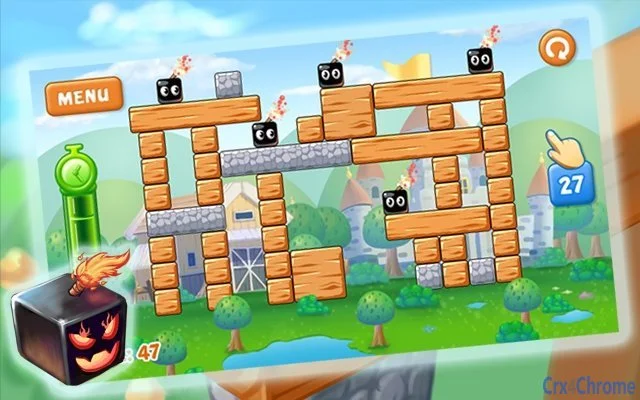
The software presents a physics-driven puzzle challenge where players must prevent a bomb from falling to the ground within a limited time frame. The core mechanic revolves around strategic use of limited breaking actions to dismantle wooden obstacles while preserving structural balance. Each level introduces a fixed number of breaks, requiring precise planning and execution. If the bomb remains intact on the platform after all breaks are used, the level is passed. Otherwise, the player fails. This game targets casual and puzzle enthusiasts seeking a mentally stimulating experience with a touch of tension. The developer did not provide additional information about their background or prior projects. Real-world usage scenarios include short gaming sessions during breaks, stress relief, and cognitive skill development through spatial reasoning and timing. The game’s simple yet engaging premise makes it suitable for players of all ages, particularly those who enjoy minimalist, logic-based challenges.
Key Features & Capabilities
- Physics-Based Mechanics – The game relies on realistic physics to simulate how structures react when obstacles are broken, affecting the bomb’s stability.
- Limited Breaks Per Level – Each level grants a fixed number of breaking actions, encouraging careful strategy rather than trial-and-error.
- Obstacle Differentiation – Wooden structures can be destroyed, while stone blocks remain intact, adding complexity to planning.
- Time-Constrained Gameplay – Players must act quickly and efficiently to prevent the bomb from falling before the time limit expires.
- Progressive Difficulty – Levels increase in complexity, introducing new configurations and challenges to maintain engagement.
These features support gameplay that emphasizes precision, anticipation, and spatial awareness. For example, players must assess which wooden supports to remove first to avoid destabilizing the structure. The limited breaks encourage thoughtful decision-making, making each move count. The game’s mechanics are ideal for short bursts of focused play, suitable for use during breaks or downtime. It also promotes cognitive engagement by requiring players to visualize structural outcomes before taking action.
User Interface, Workflow & Performance
The user interface appears designed for simplicity and direct interaction, focusing on core gameplay without distractions. Navigation is likely intuitive, centered around the main play area where the bomb and obstacles are displayed. Players interact with the game through direct input, such as clicking or tapping to break selected wooden blocks. The workflow follows a linear path: load level → assess structure → execute breaks → monitor stability → pass or fail. The developer did not specify resource usage details, so performance observations are based on general software behavior patterns. No reported issues with stability or lag were mentioned. The game runs as a standalone desktop application, suggesting consistent performance across supported platforms. CPU and RAM behavior were not disclosed, but the 100 MB size indicates a lightweight footprint, likely minimizing strain on most systems.
Compatibility & System Requirements
The software is compatible with Windows, Mac, and Linux operating systems, making it accessible to a broad user base. The application version is 1.0, indicating a stable initial release. The installation size is 100 MB, which is modest for a desktop game. The developer did not specify exact system requirements, so compatibility with older hardware or specific processor types remains uncertain. No minimum RAM, GPU, or storage details were provided. Platform compatibility information is limited to the listed operating systems. Users should ensure their system meets general requirements for running desktop applications. The lack of detailed specifications means that performance on low-end systems cannot be confirmed. However, the relatively small file size suggests it may run smoothly on most modern machines.
Pros and Cons
Pros
- Simple, intuitive gameplay ideal for quick sessions
- Physics-based mechanics add realism and challenge
- Lightweight at only 100 MB
- Available for Windows, Mac, and Linux
- Free to download and use
Cons
- No information on system requirements or hardware needs
- Limited visual or audio feedback details
- No mention of update frequency or future development plans
- Single-player only, no multiplayer or sharing features
- Gameplay may become repetitive over extended use
FAQ Section
Is the game available for Windows, Mac, and Linux?
Yes, the software is compatible with Windows, Mac, and Linux operating systems.
Is the software safe to download and install?
The software is distributed as a standalone desktop application. No security risks were reported. It is recommended to download from official sources to ensure integrity.
Does the game require an internet connection?
Based on the available information, the game operates offline. It does not require an active internet connection to play.
How often are updates released?
Information about update frequency was not provided. The current version is 1.0, indicating a stable initial release.
What type of license does the software use?
The software is free to download and use. No licensing details were disclosed beyond the free availability.
Final Thoughts
This physics-based puzzle game delivers a focused and engaging experience centered on timing, balance, and strategic planning. Its minimalist design and clear objective make it accessible to a wide audience, while the limited break mechanic adds depth to each level. The cross-platform availability and free pricing make it an attractive option for casual gamers and puzzle lovers. Despite the lack of detailed system requirements and future update plans, the game’s lightweight nature and straightforward mechanics ensure broad accessibility. For users seeking a quick mental challenge with a touch of tension, this software offers a rewarding experience. The combination of physics realism and progressive difficulty enhances replayability. Download Physics Puzzle Challenge now.
Guides & Tutorials for 3D Bomb Destroyer Extension for Chrome
How to install 3D Bomb Destroyer Extension for Chrome
- Click the Preview / Download button above.
- Once redirected, accept the terms and click Install.
- Wait for the 3D Bomb Destroyer Extension for Chrome download to finish on your device.
How to use 3D Bomb Destroyer Extension for Chrome
This software is primarily used for its core features described above. Open the app after installation to explore its capabilities.
User Reviews for 3D Bomb Destroyer Extension for Chrome 0
No reviews found





